Your cart
There are no more items in your cartHow to Choose the Right Fiber Optic Cable

Choosing the right fiber optic cable involves more than picking single-mode or multimode. The jacket, connector, and strand configuration all need to match your installation environment and network equipment — and getting any one of them wrong can mean a cable that doesn't fit your ports, doesn't meet code, or doesn't survive the environment it's installed in.
If you're not yet sure whether you need single-mode (OS2) or multimode (OM2, OM3, OM4, or OM5) fiber, see our companion guide, Fiber Optic Cable 101: How It Works, for a breakdown of fiber types, speeds, and distances. This guide covers everything else: jacket types, connectors, strand counts, common installation mistakes, and a full checklist to run through before you order.
The Fiber Cable Selection Process
Selecting the right assembly is easier when you work through it in order:

- Start with your equipment and transceivers: The transceivers on each end determine the fiber type (OS2, OM2, OM3, OM4, or OM5), the connector type, and often the maximum supported distance.
- Identify your installation pathway: Whether the cable runs through a plenum space, a riser shaft, outdoors, underground, or indoors determines the fire rating and environmental protection it needs.
- Match your connectors: Confirm the connector type and polish required at each end of the link.
- Determine strand count and configuration: Decide whether the link needs simplex, duplex, or multifiber cable based on the transceivers and network design.
- Add protection as needed: Consider armor, crush resistance, rodent resistance, or tactical construction if the cable will be exposed to physical stress.
- Measure length accurately: Account for routing, vertical runs, bends, and service loops — not just the straight-line distance between endpoints.
The sections below walk through each of these decisions in detail.
Fire and Environmental Ratings
A cable's fire rating and environmental protection are driven by building code and the conditions along its pathway — not by how physically rugged the cable needs to be. This is a separate decision from the physical protection covered in the next section.

Plenum-Rated Cable
[Plenum-rated cable] is designed to limit flame spread and smoke generation in spaces that circulate environmental air.
Best for Environmental air-handling spaces, including certain areas above suspended ceilings or below raised floors, and pathways requiring an OFNP rating.
Plenum cable may cost more, so it may be unnecessary when the installation pathway does not require it.
Riser-Rated Cable
[Riser-rated cable] is designed for vertical pathways between floors. It is flame-resistant but does not meet the same smoke requirements as plenum cable.
Best for Riser shafts, building backbones, equipment rooms, and other non-plenum indoor pathways.
Low-Smoke Zero-Halogen Cable
[Low-smoke zero-halogen], or LSZH, cable is designed to produce limited smoke and minimal corrosive halogen gases when exposed to fire.
Best for Ships, tunnels, transportation facilities, military installations, industrial sites, and projects that specifically require LSZH construction.
LSZH does not automatically mean plenum or riser rated.
Indoor/Outdoor Cable
[Indoor/outdoor cable] combines an indoor flame rating with protection against conditions such as moisture, ultraviolet exposure, and temperature changes.
Best for Outdoor conduit, campus networks, building-to-building links, security systems, and routes that transition between outdoor and indoor environments.
The cable's exact water resistance, UV resistance, and indoor fire rating should still be confirmed before installation.
Outdoor and Direct-Burial Cable
Outdoor cable is designed to withstand moisture, sunlight, temperature changes, and other environmental exposure.
Direct-burial cable includes additional protection that allows it to be installed directly in the ground without continuous conduit.
Best for Underground pathways, exterior networks, telecommunications infrastructure, and building-to-building connections.
Not every outdoor cable is rated for direct burial or extended indoor use.
Physical Protection: Armored and Tactical Cable
Fire and environmental ratings determine where a cable is allowed to go. Physical protection is a separate decision based on how much physical abuse the cable will face once it's there — and a single cable can require both at the same time.

Armored Cable
Armored cable includes an additional protective layer that helps resist crushing, impacts, rodents, and other physical damage.
Best for Warehouses, industrial facilities, outdoor pathways, conduit, rodent-prone areas, and physically demanding installations.
Armor is a cable construction, not a fire rating. An armored cable may still require a separate plenum, riser, indoor/outdoor, or outdoor rating.
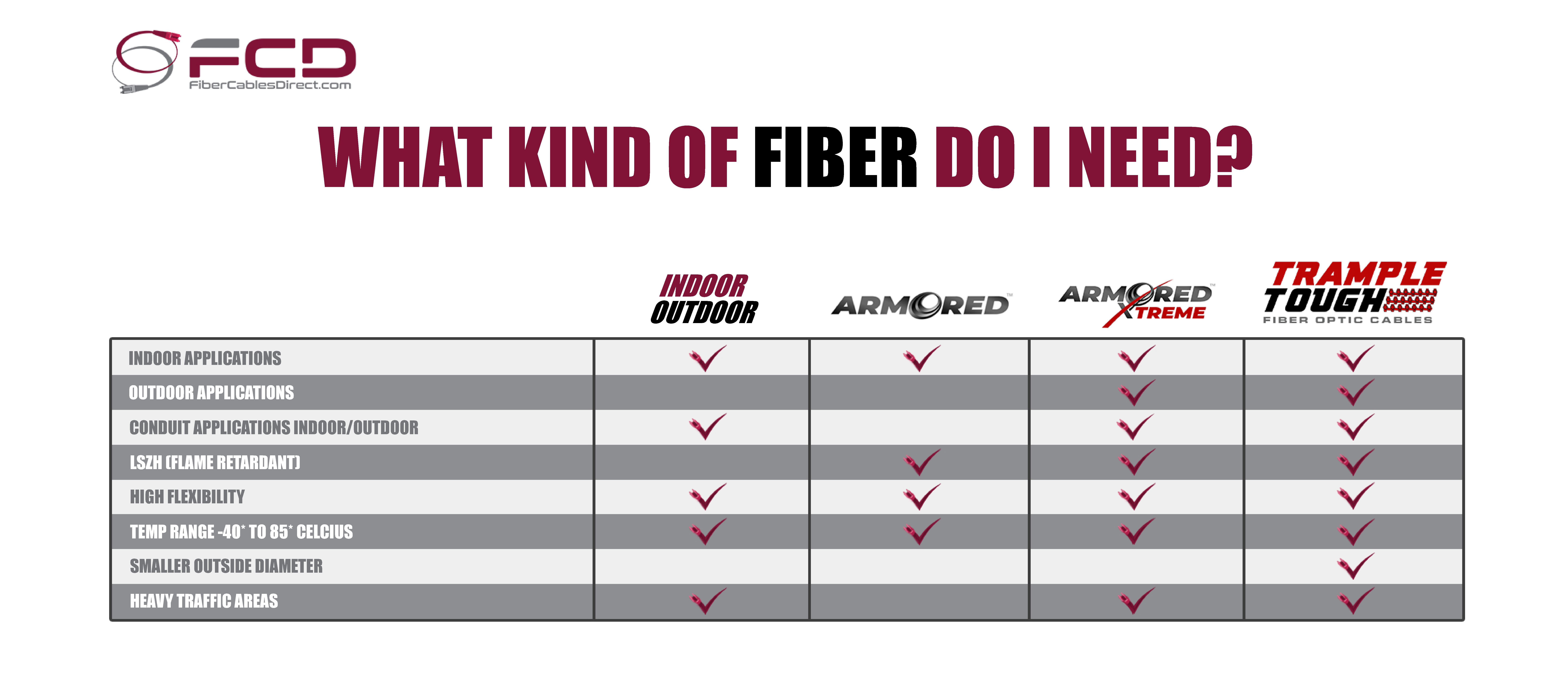
FCD's Armored Xtreme™ fiber optic cables provide added protection for demanding indoor and outdoor applications.
Tactical and High-Traffic Cable
Tactical fiber uses a flexible, rugged construction designed for repeated deployment, coiling, foot traffic, temporary installations, and demanding field conditions.
Best for Concerts and live events, sporting venues, broadcast production, convention centers, military field operations, and temporary industrial installations.
FCD's Trample Tough™ fiber optic cables are designed for high-traffic and frequently deployed applications.
The best cable is not necessarily the toughest or most expensive option. It is the one that satisfies the installation environment, applicable code requirements, and expected level of physical stress.
Fiber Optic Connector Types
The connectors at both ends of a fiber optic cable must match the equipment being connected. A cable can use matching connectors, such as LC-to-LC, or different connectors, such as LC-to-SC.

LC Connectors
LC connectors are compact and commonly used with modern switches, transceivers, and high-density patch panels.
Best for Data centers, SFP transceivers, server rooms, and enterprise networks.

SC Connectors
SC connectors use a larger push-pull design and are commonly found in telecommunications systems, broadband networks, patch panels, and older equipment.
Best for Fiber-to-the-home systems, telecommunications networks, patch panels, and building backbones.

ST Connectors
ST connectors use a round, twist-lock design similar to a bayonet fitting. They are less common in new installations but remain present in some older systems.
Best for Legacy multimode networks, industrial systems, security equipment, and educational facilities.

MTP/MPO Connectors
MTP/MPO connectors contain multiple fibers within one compact connector. Common configurations may include 8, 12, 16, 24, or more fibers.
Best for High-density data centers, trunk cables, breakout assemblies, multifiber backbones, parallel-optics applications, and networks requiring rapid installation or future expansion.
MTP/MPO cables must also match the required fiber count, polarity, pin configuration, and equipment setup.
Connector Polish: UPC vs. APC
Fiber connectors are polished into slightly different shapes depending on whether they use Ultra Physical Contact (UPC) or Angled Physical Contact (APC) polish. The polish affects how much light reflects toward the source, which matters most on links sensitive to return loss.

UPC Polished with a curved, domed end face. Typically identified by a blue connector body and used in data center, LAN, and general enterprise applications.

APC Polished at an 8-degree angle to reduce back reflection. Typically identified by a green connector body and commonly required for telecom, fiber-to-the-home, and other return-loss-sensitive applications.
UPC and APC connectors are not interchangeable. Mating them creates poor physical contact, increases signal loss and reflection, and may damage the connector end faces.
Simplex, Duplex, and Multifiber Cables
These terms describe the number of fiber strands in the cable, not whether the cable uses single-mode or multimode fiber.
Simplex
A simplex cable contains one fiber strand. With compatible bidirectional transceivers, one strand can carry data in both directions using different wavelengths.
Best for BiDi networks, sensors, telecommunications, and equipment designed for single-fiber connections.
Duplex
A duplex cable contains two fiber strands. In a typical Ethernet link, one fiber transmits data while the other receives it.
Best for Switch-to-switch connections, SFP transceivers, enterprise networks, and data centers.
Multifiber
A multifiber cable contains several fiber strands within one cable or connector system.
The fibers may terminate in separate connectors or in one MTP/MPO connector.
Best for Data center backbones, breakout assemblies, high-density patching, MTP/MPO systems, and networks requiring room for future expansion.
For example, a cable may be OS2 single-mode duplex, OM4 multimode duplex, or OS2 single-mode multifiber depending on the application.
Measuring Cable Length Correctly
Cable length is easy to underestimate when only the straight-line distance between two points is measured. A run that looks short on paper can end up considerably longer once it's actually routed.
- Routed distance: Follow the actual physical pathway, including turns, offsets, and detours around obstructions — not a straight line on a floor plan.
- Vertical runs: Add extra length for cable traveling up through risers, conduit, or between floors.
- Bends: Cable routed around corners or through tight spaces needs enough slack to stay within its minimum bend radius.
- Service loops: Extra length at each end provides room for maintenance, equipment moves, and future changes without replacing the entire run.
- Connector-to-connector measurement: Confirm whether the length ordered refers to the finished, connector-to-connector length of the assembly, since that's what determines whether it will actually reach.
Ordering a cable that turns out too short after installation is one of the most common — and most expensive — mistakes in a fiber project. When the routed distance is uncertain, it's worth rounding up.
Common Fiber Installation Mistakes
Avoid these common problems:

- Mismatched connectors: Ordering connectors that don't match the equipment prevents the link from physically connecting or forces a field re-termination.
- Mixed fiber types: Combining single-mode and multimode components on the same link can cause significant signal loss or complete failure to link up.
- Exceeding bend radius: Bending cable tighter than its minimum bend radius stresses the glass fiber internally, which can crack it or increase signal loss — sometimes without any visible damage to the jacket.
- Pulling on connectors: Pulling a cable by its connector instead of its strength members can damage the ferrule or disconnect the fiber inside, even if the jacket looks fine.
- Dirty end faces: Failing to inspect and clean connector end faces is one of the most common causes of fiber link failures — a single speck of dust can block or scatter the signal.
- Wrong environment rating: Using indoor-rated cable outdoors exposes it to moisture and UV degradation it wasn't built to handle.
- Assuming armor covers everything: Armored cable still needs its own separate plenum, riser, or outdoor rating — armor addresses physical protection, not fire code.
- Underestimating length: Measuring only the straight-line distance and skipping routing, vertical runs, or service loops often results in a cable that's too short once installed.
- Incorrect polarity: Ordering the wrong MTP/MPO polarity or pin configuration can misalign transmit and receive paths, breaking the link even though every connector appears to be seated properly.


Need Help Choosing a Cable?
Fiber Cables Direct supplies fiber optic cable assemblies for data centers, telecommunications, government infrastructure, industrial facilities, broadcast systems, live events, and building-to-building networks. FCD offers standard and custom assemblies, factory-tested before shipping, in rugged, armored, and tactical constructions for demanding installations. Domestic sourcing options are also available for projects with TAA, BAA, or Made-in-USA requirements.
Contact an FCD cable specialist with your required fiber type, connectors, length, quantity, transmission distance, and installation environment — or browse the fiber optic cable catalog to get started.
Get an Instant Quote